If you were not already aware, TASI is another JISC funded service that we promote. Together with their core services (see below) they now offer on demand image training, where they can come to you. Read about this tailored service on their website : http://www.tasi.ac.uk/training/on-demand.html
The main services provided by TASI are:
Information service over 80 technical and theoretical advice documents providing accurate and up-to-date information for all levels from beginner to digitising professional
Help desk service free help and advice on topics such as planning your digitisation project, resolving digitisation problems, buying equipment and using digital images
Workshops a wide range of technical subjects catering for all levels, with hands-on practical exercises and training
Mailing list providing access to imaging professionals within the education and cultural sector communities for the sharing of information and experiences
Image sites a searchable and browsable resource that details information about digital image collections that are available on the Internet for use in learning, teaching and research
Resources such as case studies of digitisation projects and tools to help take the stress out of calculating file size, print size and storage space requirements
At last weeks second virtual worlds forum at Keele University we watched a presentation by Joel Cockrill of Movix Media. Based in Bangor, this media company has spent the past two years researching and developing a new Multi User Virtual Environment (MUVE ), a bit like Second Life , only much better ( they claim). Joel spoke at length about their involvment in Second Life projects, which has lead to the development of a new MUVE called MUVLE. They seem to have learned alot and have taken the best bits of SL and developed a completly hosted MUVE "solution". They are currently on the look out for beta testers in education. So if you are a College or University and want to host and develop your own MUVE within the safe confines of your institutional firewall, then MUVLE could be the answer? As an alternative you could also consider Twinity, or you could try Googles new app called Lively which may do the job?
At the same forum Mark Childs discussed the Theatron (Eduserv) project at King's College London, and his MUVE reseach at the University of Warwick. The theatron project allows educators to book time to used virtual theatres (eg, the globe) to run virtual performances in Second life. The ancient stages have been built to a very high degree of detail. You will need a good T1 connection and alot of (rendering) patience then?
Also of note, was a short presentation by Jerry Foss, who had managed to build the Birmingham Millenium Point in stunning detail, as part of a film makers course pilot study. Unfortunately no one can view it or even see it ( due to IP issues)! This was constructed by Daden ltd ,who was also showing off a mash up between SL and Google. David Burden of Daden was demonstrating a kind of sphere that rezzed up maps of local areas using 2D & 3D Google maps. Very neat stuff. You have to watch the video to really see what it can do, it's fab. An engaging way to teach geography, mapping, geotagging, data mashups, spatial awareness, 3D modelling, etc. Geography never looked so interesting.
Before I forget. Stuart Thomason of Keele University used SL in his teaching last year. An IT student used SL to create a virtual rubic's cube. This is one of the very few examples I've come across of SL being used in teaching (to attain credits). Although it was mentioned that Solent are using SLOODLE? Can anyone confirm this?
Continuing the Sim tip , I started..... I received a call this morning from sim venture Ltd. They won a BETT award this year for their business educational "games" based software. It's used right across the UK (in HE & FE), and is soon to be licenced by the excellent Bized website, that also hosts some sim type educational games.
Knowledge-able : That's how Mike Wesch has described (one of) the attributes future students should possess. The hour long video below (created June 2008) discusses how Mike Wesch uses a number of connected web tools (wiki, RSS feeds, Youtube, twitter, etc)to create a platform for participation using netvibes. Not a VLE or eportfolio in sight! His previous videos blow open the myth of keen students eager to attend red brick educational institutions. They do want to learn, but not neccesarily in a musty old lecture theatre , one to many/empty vessel, method. You can see two of his previous videos "the machines are using us" and "a vision of students today" on you tube.
Towards the end of the video he describes how he uses a simulation game to get his students to learn about cultures. The whole video is fascinating for anyone connected with teaching & learning. This is truely student centred pedagogy, and the web tools are merely there to help him faciliate the process. There is one interesting part in the vid where he talks about piloting student self assessment. Basically this went pear shaped, and he had to step in. but , all of his other ideas seemd to have worked well.
For me the use of the wiki has really enabled him to put the onus of learning back into the student domain. The points he makes about information, knowledge and the how we are uploading more and more to create the web is fascinating stuff. This man has been teaching for about 5 years now. He is using a suite of free web based tools (see list below) to create a truely collaborative, engaging and participative platform.
Interestingly he also mentions the abiltiy to listen to questions posed and to ensure the students are encouraged to ask more and deeper questions, to promote discssion and reflection. In a recent webcast by Martin Dougiamas (the man who made Moodle) he hinted at developments in Moodle to ensure just that, i.e. enable students to ask questions! Reminds me of the importance placed on the Laurillard conversational model when designing e-learning resources.
The list of web tools Mike Wesch used with his students, all aggregated in his netvibes portal : http://www.netvibes.com/wesch Netvibes is like igoogle, which is like pageflakes.
Twitter - a micro blogging / social network tool A wiki - a collaborative website RSS feeds - a method of pushing new web data to you del.icio.us - user shared books marks Youtube - user shared videos facebook - a social networking tool diigo - a bookmarking and "highlighter" tool , allows you to make notes and share them blogger - millions of users musings. Search blogs with technorati Jott - converts voice to text - can be linked to twitter lexisnexis - a research portal that aggregates articles 2D barcodes read by mobile phone - no idea.. but sounded interesting An online video editor - a web based application that allows collaborative video editing a netvibe portal - web portals aggregate information created by other web based applications
He also mentioned that we should look at killer startups, to find out where the next bebo, facebook or myspace is comming from!
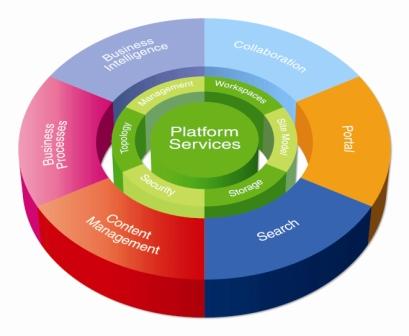
Apparently it's all about adhering to and supporting open [data] standards! Confused (I was)? Well, I was talking to some learned colleagues yesterday about the viability of using MS Sharepoint as a College wide content management system (CMS). Basically, if you were a IT manager and were looking to replace/upgrade that old clumsy intranet, you would choose a content management system. This allows specificed admin/users to manage their parts / documents. I was under the impression that MS Sharepoint did the job well, but apparently not!.. it's all about being able to migrate data around safely in the future - I just learned. Read more here :
Rumour has it that PebblePad (the eportfolio tool) has developed a new beta version that incorporates the Turnitin - text matching tool. which is nice :o).
It doesnt really surprise me HEFCE looks on shaky ground when we've got a plethora of new "organisations" popping up to confuse us even more. DIUS, DCSF, LLL, LSIS, skills + strategy + 14-19, WP, and........
Earlier on this year I posted an overview of DimDim the excellent and free webcasting tool, that IMHO is as good as some of the 15k - 20k established products out there. Well, just today, my good elearning friend @ Stafford Uni, Helen Walmsley gave me a quick demo of WizIQ . I'm impressed (again) - easily done! It works well, and also incorporates a kind of social networking angle into the software, buy attempting to get you to sign up to their network to share ideas, resources, etc.
If you host a meeting you don't have to install a client bit of software (As you do with DimDim), but it doesn't have desktop sharing that DimDim offers. Apart from that it's very similar to DimDim. Neither of them (video) record the whole session that some of the top products do. But I suppose you could use Wink or another "screencam " tool to do this? --------------------------------------------------------------------------------------- STOP PRESS - WIz IQ can record & archive sessions - my apologies - see comment at bottom of this posting.
I also sat through a demo of Adobe Connect recently which pitches Connect up in the top 3 webcasting products out there. Adobe connect can handle multiple webcams synchronously, and be able to split larger groups into smaller breakout "rooms for discussions. It can do more , but those two worked well i nthe demo.
The recent Adobe Connect archived conference session run by RSC SW is also well worth a look to experience what a recorded session looks like. Watch it @ URL : http://www.eduweb.plymouth.ac.uk/p75106536/
You can also see what the interface for Connect looks like during the video. Melanie Roberts ( elearning technologist at RSC SW) facilitated this session, which was done using a wireless connection! Scary stuff (wirelessly), but apparently it worked. Melanie contributed to our protocols (see below).
Finally, if you are thinking of using webcasting to present/discuss/teach at a distance, please peruse the list of protocols we have put togehter. Following these should make your session run much more smoothly. Please contact me if you want to contribute to these protocols.




 Posts
Posts


