I found these stats in the image capabilities of the new iphone. I knew they had improved since Vs 1, but was surprised to see by how much. BTW, the new iphone 4 also has a front camera as well as the back one.
Now back to my new work iphone4. I took delivery of it yesterday. Out f the box, it's less curvy than my old (orginal version 1), but on first inspection the interface is much improved. The most obvious difference is the obligatory 4 digit passcode needed to accces it. Not a bad idea.
I re-instated my itunes account to begin download new apps. More about those on following posts.
I tested the camera and video functionality yesterday and was impressed by the ability to shoot video and images from the same app. Not sure of the quality yet, but I do know there's an imovie app that enables simple video editing on the move. I'll try that soon. ~ I've just downloaded the first images and; I'm very impressed at the quality (much improved - see above).The video clips I shot yesterday are also very good quality - apart from the fact that I shot them in portrait format - and I should have used landscape! I'll upload one of those videos to vimeo and embed it in this post shortly. But again the video quality looks outstanding for a mobile phone :OD
Now to add the Blackboard and Pabblepad apps. I'll update you on those and others in the near future. I'll also put up another post about the video capabilities of sed iphone, soon.
Today I had a bit of fun "reviewing the new and; very funky logiech SPHERE webcam. Not the most technically indepth review, but as you can guess I liked it. Oh and BTW it was recorded using the simples Iflip video camrea. The face tracking function kinda works, if U don't dance around the office! Ideal for those webinars?
Just found out that etherpad has been finally shut down - but now replaced by Titanpad. It does exactly the same as etherpad, i.e. real time collaborative editing. Kind of like a wiki - but "live" - scary, but fun.
There's also http://ietherpad.com/ - which Iwas told is now a fully Open Source version of the now defunct etherpd? Not sure of that tho'?
So also www.wallwisher.com , which is also fun and works like post it notes in your browser - again in realtime - and shared.
Nb. Google purchased etherpad technology to make google Wave. Which is nice. And I've just been informed that the old etherpad team are working on Google doc's. Which we also like :OD
Just been trying out two new tools to generate screencasts and; video interviews. Both free web based tools - no need to install. Just register and go.
The first I had a play with is Screentoaster.com . Free & simple to use. An alternative is www.screenr.com - also free, but needs a twitter account to sign up with!
My screentoasted effort was upload to Youtube, which took about 45 mins! That allows you to share it & use an embed code to add it to a VLE or a blog. N.B. Screentoaster needs a JAVA VM install , and id not work with Google Chrome?
The second tool I experimented with is http://wetoku.com/, this allows you to record/interview someone, live! Use a webcam + headset. The results are very good. You could use it for assessing learning, discussions, recording ideas & conversations. An alternative to Skype, as it requires no dload of softwarezz.
The Vid below is a quick test we conducted in the office. Much fun. I used a farily expensive Logitech webcam, but it's quality is overshadowed by Jane's inbuilt webcam on her Apple mac book thingy. So, you could interview someone & post the conversation on a blog like this :OD. Simples. We love Web 2.0
Happy new year everyone. Whilst I'm a bit too busy to write something of my own this week, I'd though I'd share the top 125 elearning'ified blog posts of 2009 with you. I've read a few of these, and I think you should too. :OD
You can see by the above embedded audio waveform, we've added our monthly podcast to www.soundcloud.com. This allows registered users to add comments onto an audio podcast at specific points.
As well as our usual e-learning musings I had the chance to speak to Mr Stuart Chadwick who is a solutions architect for the award winning e-learning company Kineo. Stuart discusses their rapid e-learning ethos and tools, plus Kineo services to customise Open Source applicatons such as Moodle. Click here for the full interview.
p.s. We have been trying to keep our monthly musing below 30 mins - but have lasped back to a brain bursting 39 mins'! My fault. Must try harder next month. Even 30 min's is considered too long in some circumstances! I've just read a paper from the ALT-J called "The value of using short-format podcasts to enhance learning and teaching", in which the study looked at podcasts at varying lengths - anywhere between 3 - to a mammoth 8 minutes! Interesting paper covering the pedagogy and perceived advantages of podcasts for learning.
I have recently become aware of some excellent tools that allows us to follow the tweetings of others without the need to sign up for anythng. :O)
And......... these tools also allow us to filter out the twitter wheat from the twatter chaff> Which in my view is using the web more intelligently. The first has been out for a year or more called tweetdeck. It allows you to filter and download tweets onto UR phone or PC. People who've used it report it being very good as a way at managing the avalanche of twitterings. But it requires an install- FAIL!
The next one I was told about at an online webinar with Elliot Maise recently. During the hour webinar someone told me he was using twitter to tweet about sed webinar - and I could catch them on Twitterfall. It's a website, that essentially aggreagtes tweets. Simple & effective. And agian you can apply all sort of filters to only receive the info you want. Neat.
We are running the final day of our online conference today and have a ful day of presentations focussing on gaming technologies applied to educational contexts. We have been handed a few videos that discuss the use of the Sony PSP. I thought I'd share them with you. Very interesting stuff - especially the Second sight video.
We also had a live session run on the DimDim webinar platform by Karl Royle who talked about the use of gaming technolgoies generally in education. A very intersting session. Watch it online here:
just thought I'd write a quick review of two very good e-learning tools I've recently experienced.
The first is a true rapid e-learning product called Articulate. The 2009 update and can plug-in to Powerpint to create very slick looking learning objects, consisting of a suite of quiz tools and other modules. You can easily and quickly create some very engaging self contained learning objects that can be exported to a standard packaged format and upload into your VLE in a jiffy. The results are very professional looking, and you can "re-skin" the results to brand the resultant screens with logos, etc. Making a slick looking packaged learning design. Add Flash widgets, videos, and other Javascripts and you are up there with the best of them. I sat down with a mate recently who ran through a series of pitches for some high profile customers. He had used Articulate to great effect. I was very impressed with the highly professional results. It's a must for those busy academics and small e-elearnning teams who need to bang out some high quality learning objects to populate those empty VLEs. Read some glowing endorsements here.
I used to use the wonderful tool called Course Genie to do this a few years ago. It's now called Wimba Create.
The second tool I am reviewing is a student voting system by one of the main market leaders Promethean.
Promethean sell voting systems, and interactive whitboards. I used the active expression handset ( see above) in conjunction with the activestudio software. I ran a series of questions in a 1 day conference last week. The whole day went extremely well, and the voting kit provided an extra dimension of delegate particpation in the day.
The authoring environment was very easy to use install and use. The hard thing was triple checking the questions to ensure the wording was not biased. The system has a whole range of question types and each screen can be easily customised to add logos, images and other media. I pre-authored the questions before the conference, and pre-registered 90 handsets before I gave them out. I must admit I did practice a few times before I ran the questions in the live conference. On the day the system ran perfectly and was able to show responses immediately on screen once everyone had voted. It really is a very slick system. The tools even allow you to run another quick question on the screen whilst you debate the results of the previous vote. Simple to use & set up, effective and encourages student response.
You can even export the results into a spreadsheet to run some more complex statistical analysis of the resultant data. I really was impressed with the whole system. and it can also "plug-into" PowerPoint" to present a more familiar interface for those too busy to learn a new interface. And the online community pages set up under the Promethian World banner, allows you to upload and share your resources with others across the globe. Those clever Promethean people really have thought of everything.
A viable alternative would be those Quizdom sets, which offer simialr level of functionalities.
"The Box", is the new CD Rom that educators can use to help the, plan and manage their projects. It's a brand new resource given away by JISC infonet to promote their new'ish Infokit called P3M - which covers
The CD contains a suite of tools (mostly Word docs) that are templates to use for the following areas of project start up, management, and finally closure. The areas covered are;
Setting the business case
Project initiation document
Stakeholder analysis
Roles and responsibilities
Risk management
Risk assessment
A project controls database
Change request form
Post project review
During our recent bid writing event (where you can find some excellent tips), comments were made from the presenters regarding the lack of basic project management skills in some bids – inevitably resulting in their failure. If that's a weakness in your team, this little box of trix – may help upskill and keep that (funded) project on track.
Delivering streaming video media safely and securly via your College or Uni learning environment has just got easier. Read on. The Learning and Skills Network has introduced MoLeTV which will be targeted primarily to colleges in England, under the auspices of the Learning and Skills Council. Find other Molenet resources including the new mobile technologies resources on the molenet site.
Use of this new digital media site enables registered users to upload media in most of the common formats. 'Uploaders' are able to edit and delete their content at any time.
What are the benefits of using this service?
• Promotion of curriculum content and sharing good practice
• media automatically 'streams'
• often a smaller file size
• video is converted to a variety of formats and is accessible to VLE's such as Moodle, websites, mobile devices and PDAs using the embed code and/or download links as appropriate.
• is curriculum relevant
• is primarily UK based resources
• is divided into Learning and Skills Council (LSC) categories
• saves uploading media to your college servers
• saves on back-up time for large files
• embeds as flash media and saves trouble with plug-ins for other formats cross-platform (Windows, Linux and Macintosh)
• helps stop staff uploading large AVI files to your server! (although only AVIs with specific codecs will convert)
• has RSS feeds
• will link to iTunes
• can upload podcasts and vodcasts
The website is now available at http://www.moletv.org.uk. Users can create an account on the site (login area) which will allow them to upload media.
I prefer to use the free service vimeo to host and stream my vodcasts. It's excellent quality, and does not compress the video as much as Youtube does. Resulting in a higher quality video clip. Can't always be sure of the quality of delivery tho?
STOP PRESS >>>>>>> RSCtv <<<<<<<<<<<<<
Not strictly TV, but nearly! There are a number of brilliant, free, online events for teaching and learning with technology being hosted by RSC Scotland South West over the next few weeks. I have been given permission to promote the events below to the West Midlands learning providers. All you need is a web browser to get involved - it's all ONLINE.
17th February 2009 - RSCtv: Using Blogs for teaching and learning
3rd March 2009 - RSCtv: Using Voting Systems for teaching and learning It will focus how creating stand-alone tests, adding interaction to presentations, and how they can be used to analyse student understanding. http://www.rsc-sw-scotland.ac.uk/events.htm#Mar03
31st March 2009 - RSCtv: Mobile Technologies for teaching and learning This RSCtv session will outline advantages to be gained, the possibilities for the application of mobile technologies for Learning & Teaching and will also highlight some of the issues that need consideration by learning institutions. http://www.rsc-sw-scotland.ac.uk/events.htm#Mar31
the creation of a second public service provider of scale
the modernisation of wireless radio spectrum holdings
a digital future for radio
a new deal for digital content rights
enhancing the digital delivery of public services
This promise of broadband for all links neatly with another alert I received today from BECTa, who have just launched an emerging technologies website - choc full of news , research and analysis. One page link refers to IBM redesigning the web browser to enable real time collaboration. The Project is code named 'Blue Spruce' . The vision is inspiring - using real time video, audio, screen sharing, etc. Looks impresssive.
This sounds very similar to a well establish collaborative web browser called flock - which has never really taken off - until now? Looks like the humble wiki as a collaborative tool already looks dated?
This post is a sideways look at the increasing importance of the gaming genre that's being exploited for educational use. The Bized website has some excellent simulations. And there is a newSerious Virtual Worlds report [which] focuses on virtual worlds for educational uses, and explores the ‘serious’ – as opposed to leisure-based – uses of virtual worlds.
The embedded video above is from the Coventry based serious games institute, who research this topic. They have a base in second life, which brings me neatly to my next point. Last weekend the newspapers were awash with the usual poorly researched sensationist stories about the first second life divorce. I happened to catch a Daily mail article - the so called voice of middle England! Their strap line was "Fantasy world awash with sex & porn"...Well if you hadn't noticed, so is most of the interweb! Educators are only beginning to use Second Life effectively for teaching & learning purposes, and its still early days for most. Experiential (running a conference/pop concert/shop, learning a second language) and modelling abstract concepts (modelling very large & small experiments, etc) are being investigated. As are simulations and small group teaching ideas. There is even a SL for under 18s called teengrid, supported by SCHOME. Mind you Google are shutting down their virtual world at the end of this year! But they have developed a 3D ancient Rome layer in google earth?
Mind you they said that VLEs would revolutionise teaching!!
Back to the plot. Last weeks SL divorce stories followed hot on the heals of the release of a new World of Warcraft update, which is played by millions of people online. This is a real escapist world for many. PLayers were lambasted on TV for racking up stupid amounts of hours on line. But some are seeing the potential of such games ; West Nottinghamshire College, which developed the ‘Neverwinter Nights’ Key Skills assessment tool. This is an initiative designed to encourage learners to complete work by stimulating their desire to achieve. In 2004/5 the Neverwinter project won the Association of Colleges Becta Beacon Award for The Effective Use of Information Learning Technology to Enhance Teaching and Support Learning. Last weeks lively (forgive the pun) article from the ReLIVE08 conference, draws all of these strands together much more succinctly than I can.
All this points to developers making use of new interfaces to make the technology more accessible to all. If you wander around youtube you'll see that there have been some very clever Nintendo Wii hacks. Some have even managed to turn a wii remote into a digtial/interactive smartboard ! There are loads of other youtube videos and google sites dedicated to some really useful and stupid "wii hacks". I know that some local Colleges and councils are investigating Nintendo Wii's for use with disabled learners and engaging students generally. A colleague of mine has developed learning objects/manuals for the army to be used with the Nintendo DS lite. In fact you can get an adapter to add memory cards to the DS lite, which means you could turn it into an e-book reader or watch videos or listen to podcasts?
If you are interested in establishing some positive ideas about the educational benefits of serious gaming, I suggest that you read the book Everything Bad is Good for You. It's a light and informal read, but a real eye opener. Talking of eyeopeners and assistive types of interface design - I bet you never though the amazin' drag and drop interface featured in the minority report film was just science fiction? well, it's not.
The latest release of the popular Open Disc software is out now. This is a DVD image download, choc full of quality OS softwarez.
And perhaps in an attempt to claw back some market share from the free webcasting tool DimDim, Abobe are giving away the crown jewels!! Abobe Connect the very versatile and robust webcasting tool is now free: http://www.adobe.com/acom/connectnow/
I've had a go with Adobe connect, and it's a quality bit of software. It was number 2 in my list of webcasting tools, close behind DimDim. But that was only due to the relative cost. All you need to run it is the Flash plug-in for your browser.
I'd just thought I'd up date you with a few new gadgets around at present that may interest you.
The first is my new Toshiba Portege' laptop. It's very light and a joy to carry around. It's that thin it even fits into an A4 notepad holder. Which is nice, and nearly as light as the ASUS >>
The second gadget we've all got this summer is a new ASUS eeepc to use for notetaking and web surfing. They're great, and only 200 squids. This PC market is going to grow. And you can get it in Linux or Windows flavours.
I've had a quick go with the busbi, but not sure of the quality of video. They are both designed to take short clips and copy to your PC easily, then upload seamlessly to the web (without worrynig about CODECs) . This Youtube vid compares flip with another .
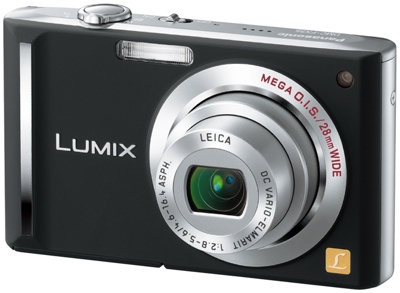
Personally I'd reccomend a good digi camera with video capability. The one I've been using recently is the Panasonic Lumix. A whopping 10X optical zoom. Its a fab compact camera, and quite resaonably priced.
The final gadget we were all provided with recently is an Orange USB modem. This allows you to access the web/email on the move (with your laptop), when not in range of a wireless network. It works a treat, but requires a little tinkering to ensure it does not conflict with your existing internet connection settings. Avaialbe on contract.
Another device I've recently come across is the Skype phone from 3G. Its available on contract and allows you to call other skype PC users. It works as a normal mobile , but with the extra skypey bit. It also allows you to tune in to certain TV stations from a nominal fee. And the phone can be used a modem to plug into a laptop on the move , abit like the USB modem above.